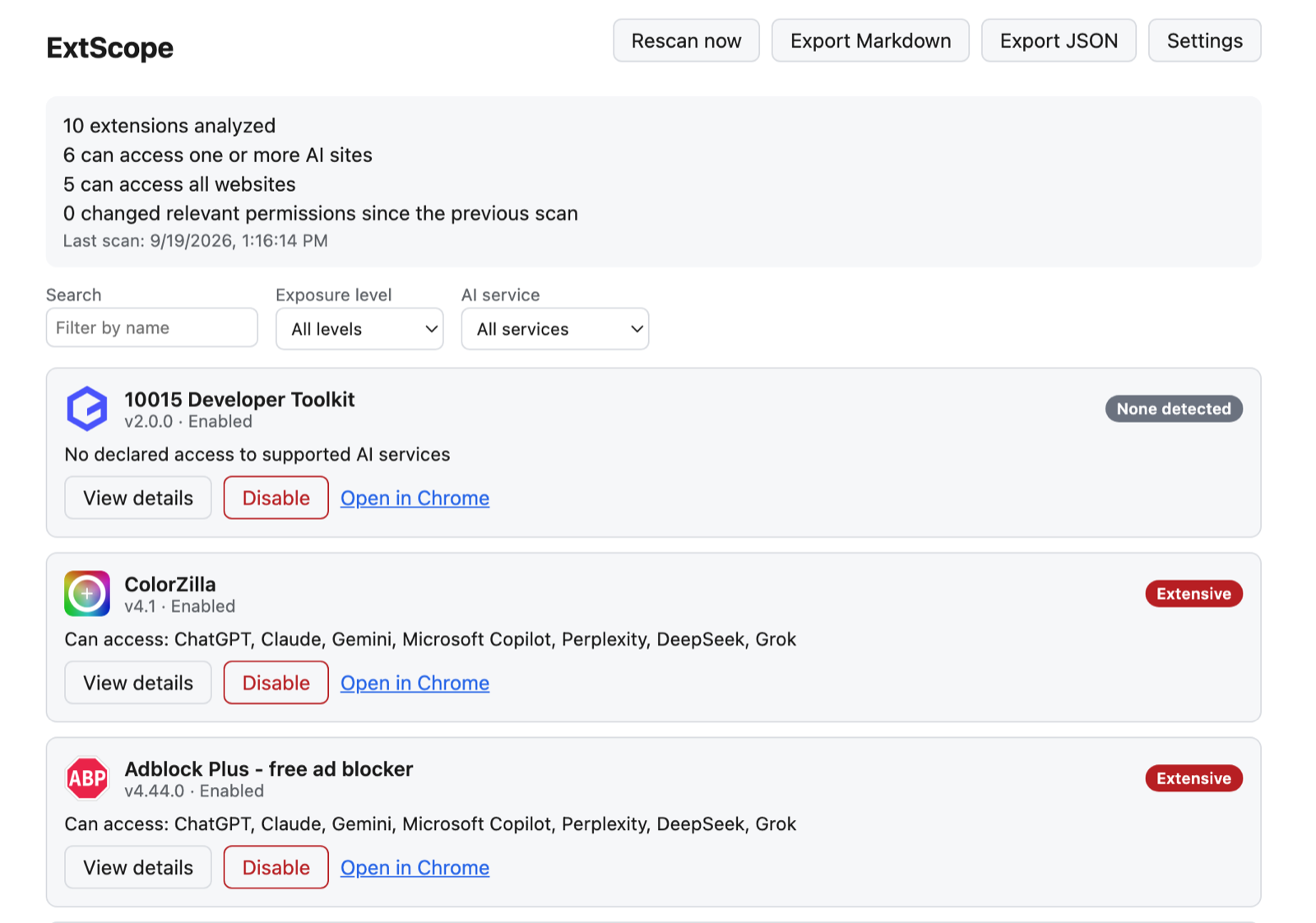
Most people know that a browser extension can ask to “read and change all your data on all websites.” Few know which of their installed extensions actually hold that grant, and fewer connect it to the tab where they are about to paste source code or a customer email into an AI assistant. ExtScope answers that one question and refuses to answer a bigger one it cannot support.
The problem
Chrome shows extension permissions one extension at a time, in a form that requires reading match patterns. Answering “who can see my ChatGPT tab?” means opening every extension, decoding https://*.openai.com/* against <all_urls> against *://*/*, and repeating the exercise whenever an extension updates. That is a job for a program, not a person.
What it's for
- Before pasting something sensitive. Check which extensions could read a ChatGPT or Claude tab before you drop in source code, contracts, or customer data.
- Periodic extension cleanup. Find the coupon finder or screenshot tool with all-site access that you forgot you installed, then disable it from the dashboard.
- Catching quiet permission changes. An update that adds host access or a sensitive permission shows up as Changed on the next scan.
- Sharing evidence. Export a Markdown or JSON report for a security review, a team lead, or a personal audit trail.
- Teams using AI tools. A quick way for developers and small companies to see their exposure before deciding on an extension policy.
It is not a malware scanner. It tells you what an extension is allowed to reach, so you can decide whether that access is justified.
My ownership
I owned the product framing, the exposure model, the architecture, the React popup and dashboard, the change-detection logic, the report exporters, the threat model, the test suites, the build and release documentation, and the store-listing materials. It is a single-author project released under the MIT license.
Constraints
- Evidence, not accusation. A declared permission is a capability, not proof of behavior. Every result had to say what was found and why it matters without calling an extension malicious.
- Trust. A tool that audits privacy cannot itself be a privacy risk, so it needed the smallest possible permission set, no servers, no analytics, and no host access.
- Explainability. An opaque risk score would repeat the problem it is meant to solve. Levels had to be derived from rules a reader can check.
- Untrusted input. Extension names and descriptions come from third-party developers, and the tool displays them.
System design
The extension is a Manifest V3 service worker plus a popup and a full dashboard, built with React, TypeScript, and Vite. Data flows through five stages, each with one responsibility:
- Inventory adapter. Reads installed extensions from
chrome.management. - Permission normalizer. Parses Chrome match patterns and classifies each as an exact, wildcard-subdomain, broad-scheme, or all-URLs grant against a versioned registry of seven AI services.
- Exposure engine. Applies ordered rules to produce None detected, Limited, Broad, or Extensive, plus a list of findings that cite their evidence.
- Change detector. Diffs the current snapshot against the previous one and overlays Changed on extensions that gained relevant access.
- Dashboard and exporters. Renders findings, offers disable and enable, and writes Markdown or JSON reports.
The service worker also listens for install, uninstall, enable, and disable events, so the stored snapshot stays current without a manual rescan.
Key decisions
A framework-free core. Everything under src/core imports neither React nor the Chrome API. I recorded that boundary in an architecture decision record. The tradeoff is that the worker and the UI each call chrome.storage and chrome.management themselves instead of going through a message layer, which is acceptable at this size and keeps the engine testable with plain fixtures.
Descriptive levels instead of a score. Extensive means access to all websites combined with a powerful capability such as scripting or clipboard access. Broad means several AI services or a wildcard grant. Limited means one service. A reader can predict the label from the manifest, and the rules are ordered so a broad host grant dominates everything else.
Fail toward visibility. The pattern parser returns null for a malformed match pattern, and the engine records it as unparsed instead of silently treating it as harmless. Misclassifying something as safe is the worse error for a tool like this.
Two permissions. ExtScope requests only management and storage. It originally listed tabs, but opening Chrome’s extension page through chrome.tabs.create() does not require it when the code never reads a tab’s URL or title back, so I verified that in a real browser and removed it.
Challenges
Hostile display strings. React’s escaping prevents markup injection, but it does not stop Unicode bidirectional-override characters from visually reordering a name to imitate a trusted extension. A sanitizer strips control and bidi characters before names reach the screen or an exported report.
Wildcard semantics. A *.example.com pattern also matches the bare host, yet it remains a wildcard grant that deserves the wider label. Getting those cases right meant writing tests for each pattern shape before trusting the engine.
Proving the privacy claim. A Content Security Policy that restricts connect-src to the extension’s own origin limits what any future code could do. The integration suite goes further: it loads the built extension into real Chromium next to a fixture extension, drives it as a user would, and asserts that every network request stays on the extension’s own origin.
Validation
Unit tests cover the permission normalizer, exposure engine, change detector, sanitizer, and exporters against fabricated manifests. A separate Playwright suite exercises onboarding, scanning, disable and enable, export downloads, data deletion, and network isolation in a real browser. The build is reproducible from a clean checkout with npm ci, and the release process publishes a SHA-256 checksum.
Outcome
ExtScope 0.1.0 is live on the Chrome Web Store and free to install. It scans installed extensions, explains each finding, tracks changes between scans, and exports reports, all on-device. You can still build it from source, and the release process publishes a checksum so the store build can be compared with the repository. It is new, so I have no adoption numbers or reviews to report yet.
Limits and next iteration
ExtScope reports declared capability, not runtime behavior. It does not detect an extension that misbehaves within its permissions, or malicious code delivered in a later update, though it does flag newly added access. The roadmap deliberately waits on evidence of real use before adding store-status monitoring, team policy files, or Firefox and Edge support. Now that it is public, the next step is learning which findings people act on and which ones confuse them.